Two currencies but show one at a rate

Gold Boarder
Topic Author
Joined on: 07 Nov 2013
Posts: 280
Thanks: 1
Ukraine
Hello.
I want to set the prices for goods in the admin panel in dollars. But the site prices for goods should be displayed in Ukrainian hryvnia. The exchange rate I will be set as in the picture.
I do not need a fractional part. If the price in the Ukrainian hryvnia is 143.50, I want to round up to 143.00. If the price is 143.60, then the price is 144.00.
Is this possible?
How much will it cost money? Will the setting be lost if I update the template in the future?
Thank you.
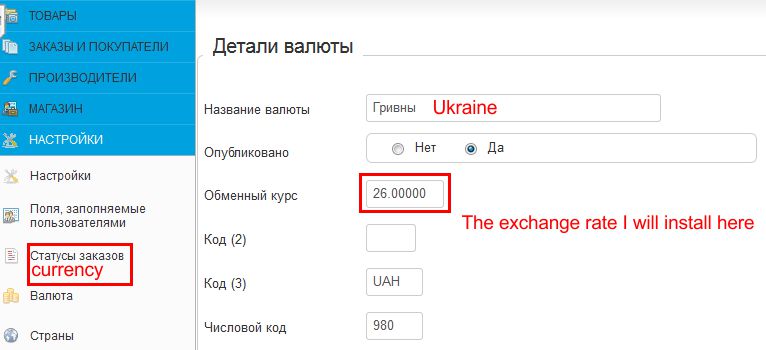
I want to set the prices for goods in the admin panel in dollars. But the site prices for goods should be displayed in Ukrainian hryvnia. The exchange rate I will be set as in the picture.
I do not need a fractional part. If the price in the Ukrainian hryvnia is 143.50, I want to round up to 143.00. If the price is 143.60, then the price is 144.00.
Is this possible?
How much will it cost money? Will the setting be lost if I update the template in the future?
Thank you.
The topic has been closed.

First of all, please note that it has no relation with your template. Price display system is purely controlled by VirtueMart itself. If you need any changes in the pricing display format then you need to adjust your VirtueMart currency settings accordingly. Therefore it can never get effected by any future template updates.
If you do not want to show the decimal places then you can set "Decimals" to 0 (zero) in your currency settings. See the below screenshot for ready reference.
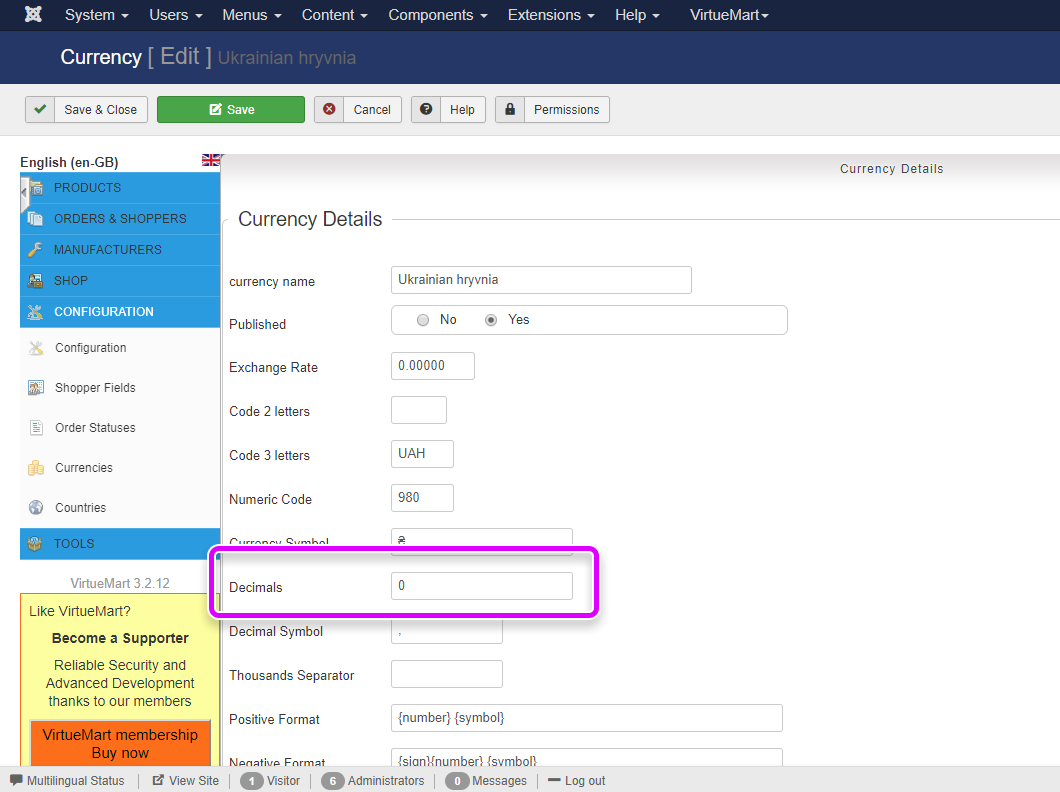
If you do not want to show the decimal places then you can set "Decimals" to 0 (zero) in your currency settings. See the below screenshot for ready reference.
Post your reviews about us on our Facebook Page.
Post your testimonials and suggestions Here.
Don't forget to Close your topic when resolved.
Post your testimonials and suggestions Here.
Don't forget to Close your topic when resolved.
The topic has been closed.
Gold Boarder
Topic Author
Joined on: 07 Nov 2013
Posts: 280
Thanks: 1
Ukraine
I need to always have two zero points in the price:
156.00
144.00
21.00
e. t.s.
156.00
144.00
21.00
e. t.s.
The topic has been closed.
Gold Boarder
Topic Author
Joined on: 07 Nov 2013
Posts: 280
Thanks: 1
Ukraine
In my country, the price looks good if it has two zeros: 150.00...
The topic has been closed.
Then you will have to hack core roundForDisplay function in VirtueMart's currency display helper instead of changing the currency settings.
File - administrator/components/com_virtuemart/helpers/currencydisplay.php
Find the following codes between lines 251 to 269:
Replace above by:
Remember that this is a core hack. Therefore you will have to make the same changes again after all future VirtueMart updates.
File - administrator/components/com_virtuemart/helpers/currencydisplay.php
Find the following codes between lines 251 to 269:
	public function roundForDisplay($price, $currencyId=0,$quantity = 1.0,$inToShopCurrency = false,$nb= -1){

		if(empty($currencyId)) $currencyId = $this->getCurrencyForDisplay($currencyId);

		if($nb==-1){
			$nb = $this->_nbDecimal;
		}

		$price = (float)$price * (float)$quantity;

		$price = $this->convertCurrencyTo($currencyId,$price,$inToShopCurrency);

		if($this->_numeric_code===756 and VmConfig::get('rappenrundung',FALSE)=="1"){
			$price = round((float)$price * 2,1) * 0.5;
		} else {
			$price = round($price,$nb);
		}
		return $price;
	}
Replace above by:
	public function roundForDisplay($price, $currencyId=0,$quantity = 1.0,$inToShopCurrency = false,$nb= -1) {

		if(empty($currencyId)) $currencyId = $this->getCurrencyForDisplay($currencyId);

		if($nb==-1) {
			$nb = $this->_nbDecimal;
		}

		$price = (float)$price * (float)$quantity;

		$price = $this->convertCurrencyTo($currencyId,$price,$inToShopCurrency);

		if($this->_numeric_code === 756 and VmConfig::get('rappenrundung', FALSE)=="1") {
			$price = round((float)$price * 2, 1) * 0.5;
		} else {
			$price = round($price, 0);
			$price = round($price, $nb);
		}
		return $price;
	}
Remember that this is a core hack. Therefore you will have to make the same changes again after all future VirtueMart updates.
Post your reviews about us on our Facebook Page.
Post your testimonials and suggestions Here.
Don't forget to Close your topic when resolved.
Post your testimonials and suggestions Here.
Don't forget to Close your topic when resolved.
vlad44b says thank you to Jumbo for this post.
The topic has been closed.
Gold Boarder
Topic Author
Joined on: 07 Nov 2013
Posts: 280
Thanks: 1
Ukraine
Many thanks!
I did not fully understand how to set up the admin panel so that the basic price in the admin panel
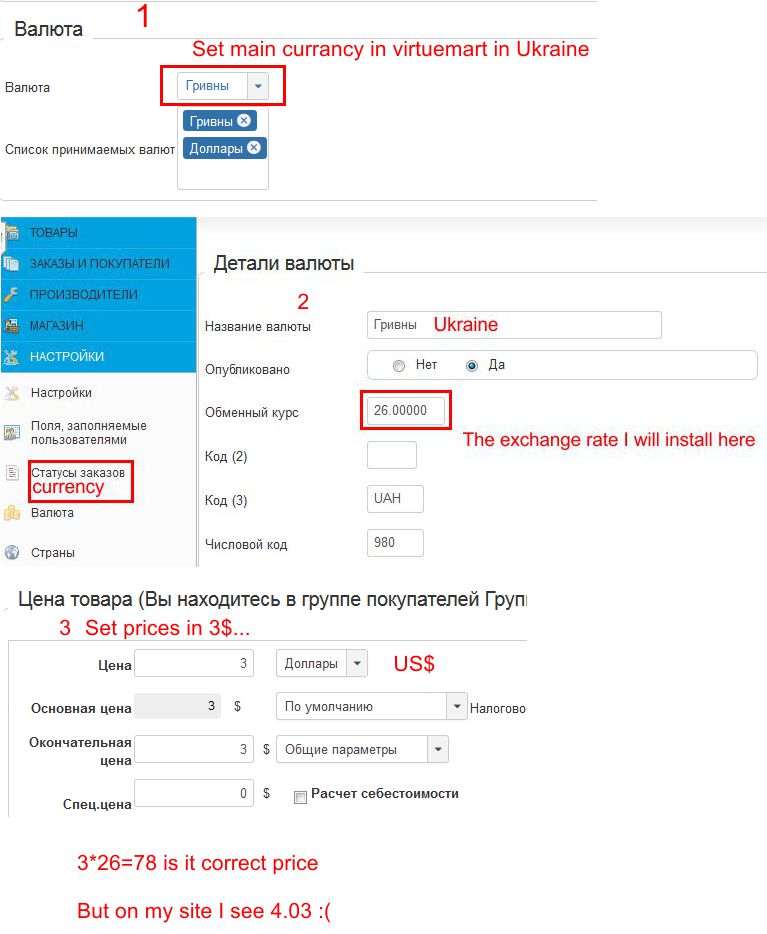
was dollars. In my country, the dollar is constantly changing in relation to the Ukrainian hryvnia. Prices in the Ukrainian hryvnia are jumping.
I want all prices to be in dollars in the admin panel, and on the site would be displayed Ukrainian hryvnia.
If the dollar exchange rate varies, I can change the course in the admin panel in one place. It would be very convenient. I try as in the picture and get absolutely not the right prices.
I did not fully understand how to set up the admin panel so that the basic price in the admin panel
was dollars. In my country, the dollar is constantly changing in relation to the Ukrainian hryvnia. Prices in the Ukrainian hryvnia are jumping.
I want all prices to be in dollars in the admin panel, and on the site would be displayed Ukrainian hryvnia.
If the dollar exchange rate varies, I can change the course in the admin panel in one place. It would be very convenient. I try as in the picture and get absolutely not the right prices.
The topic has been closed.
Gold Boarder
Topic Author
Joined on: 07 Nov 2013
Posts: 280
Thanks: 1
Ukraine
I found.
For US curransy set exchange rate 1/26=0.3846
For Ukraine not set exchange rate.
If price 10$ I got 260.01. It looks good already.
Now I need 260.00 and try Your code.
And now everything looks great!
Thank you very much!
For US curransy set exchange rate 1/26=0.3846
For Ukraine not set exchange rate.
If price 10$ I got 260.01. It looks good already.
Now I need 260.00 and try Your code.
And now everything looks great!
Thank you very much!
The topic has been closed.
Gold Boarder
Topic Author
Joined on: 07 Nov 2013
Posts: 280
Thanks: 1
Ukraine
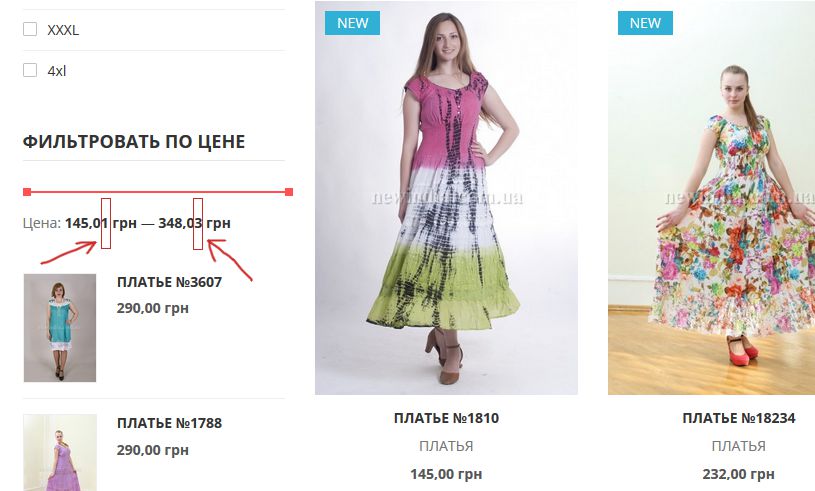
Sorry but I found big problem now in filter prices.
Not the correct values now. Please give advice on how to fix it.
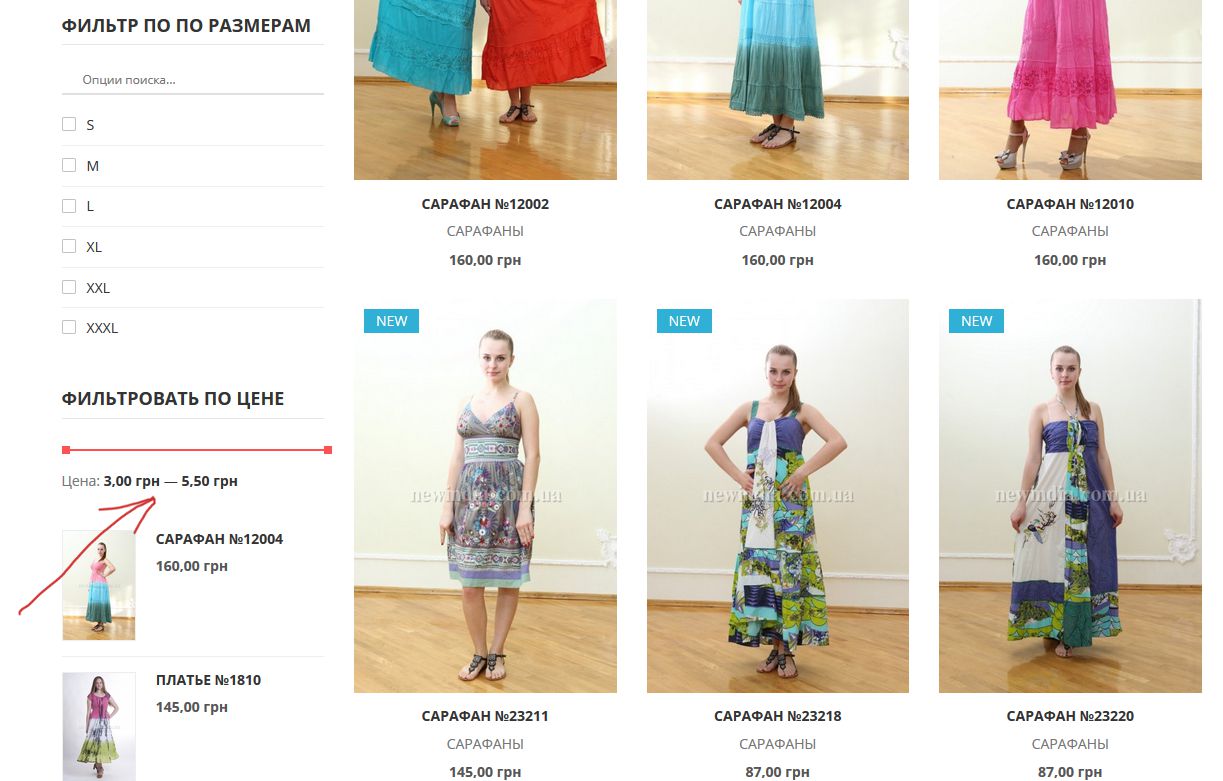
Not the correct values now. Please give advice on how to fix it.
The topic has been closed.
Have you enabled "Multi Currency Products" option in the custom filter module settings?
Post your reviews about us on our Facebook Page.
Post your testimonials and suggestions Here.
Don't forget to Close your topic when resolved.
Post your testimonials and suggestions Here.
Don't forget to Close your topic when resolved.
vlad44b says thank you to Jumbo for this post.
The topic has been closed.