Closed

Select Shipping & Select Payment (see last post)

Wed May 8, 2013 11:14 pm
This makes the text more visible as a button.
In your language files. find and edit "select payment" and "select shipping"
add this before and close in the end. <span class='btn'>Select payment</span>"
example
COM_VIRTUEMART_CART_EDIT_PAYMENT="<span class='btn'>Select payment</span>"
COM_VIRTUEMART_CART_EDIT_SHIPPING="<span class='btn'>Select shipment</span>"
Don't forget the "change payment" and shipping
COM_VIRTUEMART_CART_CHANGE_PAYMENT="<span class='btn'>Change Payment</span>"
COM_VIRTUEMART_CART_CHANGE_SHIPPING="<span class='btn'>Change Shipment</span>"
I do not like to ask unless I get confused or lost. I love to learn, I just struggle with it sometimes.
The topic has been closed.
Wed May 8, 2013 11:41 pm
Exactly where can I change this code?
The topic has been closed.
Thu May 9, 2013 12:11 am
I am sure there is an over ride folder but I just edited the one in /language/en-GB/en-GB.com_virtuemart.ini roughly line 29-30 and 37-38
forgive me if this is bad etiquette
I do not like to ask unless I get confused or lost. I love to learn, I just struggle with it sometimes.
The topic has been closed.
Thu May 9, 2013 12:13 am
Thanky you.
The topic has been closed.
Fri Aug 16, 2013 8:08 pm
Joomla provides override folders for the frontend and backend language files, into which you can place override language files for each language you use. For example the location for your english language override files is:
Frontend: yourdomain\language\overrides\en-GB.override.ini
Backend: yourdomain/administrator/language/overrides/en-GB.override.ini

Just copy the original file to the override folder and make your modifications. This way you do not have to re apply the modification when you upgrade virtuemart.
Complete article can be found at: docs.virtuemart.net/tutorials/33-templat...-displayed-text.html
The topic has been closed.
Fri Aug 16, 2013 10:04 pm
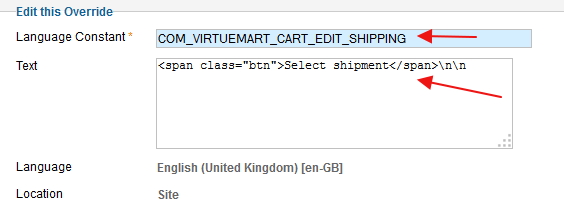
You do not even need to create your own language override file. You can easily override such languages right from your Joomla Language Manager (Go to - Extensions Manager >> Language Manager >> Overrides).
Post your reviews about us on our Facebook Page.
Post your testimonials and suggestions Here.
Don't forget to Close your topic when resolved.
The topic has been closed.
Sat Aug 17, 2013 12:40 am
Nice, That works too... Joomla Language Manager (Go to - Extensions Manager >> Language Manager >> Overrides).

For others in the forum , attached is what it looks like for one of the language overrides:
Attachments:
The topic has been closed.