
Ok,
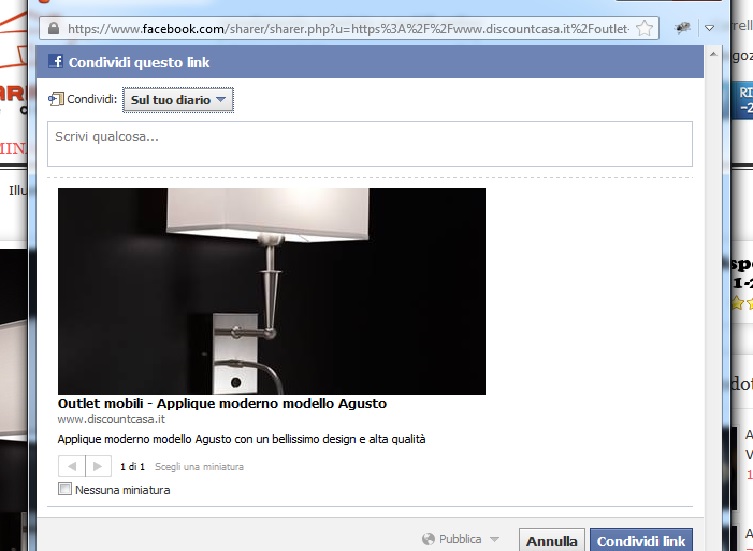
I install this plugin and now the photo for the product is too big.
Take a look at this photo.
On your demo page promart for this plugin the photo look similar, too big.
What it's wrong to pick the right photo?
Thank you
Share on facebook

Senior Boarder
Topic Author
Joined on: 30 Sep 2013
Posts: 42
Attachments:
-
-

- sharefaceb...foto.png (55KB)
-
-
-

- sharefaceb...oto2.jpg (83KB)
-

The topic has been closed.

Message from Moderator: Post moved to correct forum category.
Post your reviews about us on our Facebook Page.
Post your testimonials and suggestions Here.
Don't forget to Close your topic when resolved.
Post your testimonials and suggestions Here.
Don't forget to Close your topic when resolved.
The topic has been closed.
It is picking the correct product image but not the thumbnail size.
If you want to show thumbnail size image of your products then open plugins/system/vmogmetatag/vmogmetatag.php
Find the following codes in line 96:Replace above by:
If you want to show thumbnail size image of your products then open plugins/system/vmogmetatag/vmogmetatag.php
Find the following codes in line 96:
$productImage = str_replace(' ', '%20', $product->images[0]->file_url); $productImage = str_replace(' ', '%20', $product->images[0]->file_url_thumb);
Post your reviews about us on our Facebook Page.
Post your testimonials and suggestions Here.
Don't forget to Close your topic when resolved.
Post your testimonials and suggestions Here.
Don't forget to Close your topic when resolved.
The topic has been closed.
Senior Boarder
Topic Author
Joined on: 30 Sep 2013
Posts: 42
Ok, i made the change but I have another problem.
Take a look at this 2 photo.
On my friend account share a big photo
On my account share good !!!
Take a look at this 2 photo.
On my friend account share a big photo
On my account share good !!!
Attachments:
-
-

- share_1acc...iend.jpg (30KB)
-
-
-

- share_2_myaccount.jpg (30KB)
-


The topic has been closed.
Senior Boarder
Topic Author
Joined on: 30 Sep 2013
Posts: 42
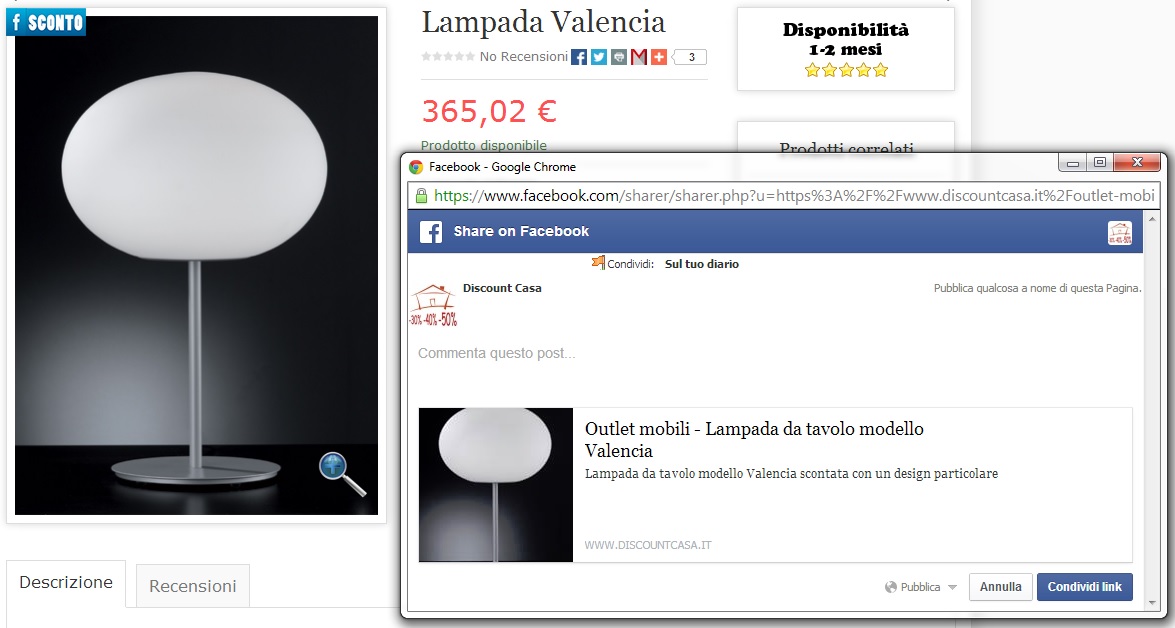
Not all the photo is take normal in thumbnail size,
take a look at this third photo.
I think that this is the problem. Not take when click share on facebook
the right dimensions and after see 2 different dimension on friend and my account
take a look at this third photo.
I think that this is the problem. Not take when click share on facebook
the right dimensions and after see 2 different dimension on friend and my account
Attachments:
-
-

- share_3.jpg (139KB)
-
The topic has been closed.
Can't help that. You need to give Facebook sometime so that it can start parsing the images correctly. It generally takes a little time. Nothing can be done on the same.
Visit these sites to understand how it works: ogp.me or developers.facebook.com/docs/opengraph/
Then you can check the source code of your site. It is showing correct meta tags.
Visit these sites to understand how it works: ogp.me or developers.facebook.com/docs/opengraph/
Then you can check the source code of your site. It is showing correct meta tags.
Post your reviews about us on our Facebook Page.
Post your testimonials and suggestions Here.
Don't forget to Close your topic when resolved.
Post your testimonials and suggestions Here.
Don't forget to Close your topic when resolved.
The topic has been closed.
Also read this to know how Open Graph Submission works: developers.facebook.com/docs/opengraph/submission-process/
Post your reviews about us on our Facebook Page.
Post your testimonials and suggestions Here.
Don't forget to Close your topic when resolved.
Post your testimonials and suggestions Here.
Don't forget to Close your topic when resolved.
The topic has been closed.
ibac2005 wrote:
Then you will understand. There nothing much we can do about it. You need to leave the rest of things of Facebook. It will take its own time before it start parsing the tags in your site just like Google.
You can also check them using Google Schema testing tool. www.google.com/webmasters/tools/richsnippets
Not all the photo is take normal in thumbnail size,
take a look at this third photo.
I think that this is the problem. Not take when click share on facebook
the right dimensions and after see 2 different dimension on friend and my account
Meta tags are added correctly to your site and you can always verify the same by seeing the source codes of the site. Look for the following example tag:take a look at this third photo.
I think that this is the problem. Not take when click share on facebook
the right dimensions and after see 2 different dimension on friend and my account
<meta property="og:image" content="http://example.com/rock.jpg" />You can also check them using Google Schema testing tool. www.google.com/webmasters/tools/richsnippets
Post your reviews about us on our Facebook Page.
Post your testimonials and suggestions Here.
Don't forget to Close your topic when resolved.
Post your testimonials and suggestions Here.
Don't forget to Close your topic when resolved.
The topic has been closed.