Closed

Hide Shipping option and show message until zip is entered

Sat Oct 5, 2013 1:01 am
I just started to use the Oe Page Checkout in my Development site to check it out. So far Very promising.

I would like to hide the shipping methods until either a billing or Shipping Zip has been entered, and I would like to display a message such as "Please provide a Billing or Shipping Zip to estimate the shipping" in the Shipping column space.

Before using the OPC, I have overidden \templates\vp_supermart\html\com_virtuemart\cart\default_pricelist.php
around line 374 with the following code. I would like to try and apply this to the One Page Checkout Code if possible., having a little trouble translating over to the new code.
My code is between /* Start hiding until zip entered */ and /* End hiding until zip entered */ comments.
        /* Start hiding until zip entered */
		<?php
		@$checkIfEmpty == "none";
		foreach($this->cart->BTaddress['fields'] as $item){
		@$checkIfEmpty .= $this->escape($item['value']);
		}
		if ($checkIfEmpty == "") {	?>
		<td>Please provide a Billing or Shipping address to estimate the shipping cost.</td>
 
		<?php } else { ?>
		 /* End hiding until zip entered */
 
      	<?php if (!$this->cart->automaticSelectedShipment) { ?>
				<td class="shipping-payment-heading" colspan="4" align="left">
					<?php echo $this->cart->cartData['shipmentName']; ?>
					<br />
					<?php if(!empty($this->layoutName) && $this->layoutName=='default' && !$this->cart->automaticSelectedShipment  )
						echo JHTML::_('link', JRoute::_('index.php?view=cart&task=edit_shipment',$this->useXHTML,$this->useSSL), $this->select_shipment_text,'class=""');
					else {
				    echo JText::_('COM_VIRTUEMART_CART_SHIPPING');
					} ?>
				</td>
				<?php } else { ?>
        <td class="shipping-payment-heading" colspan="4" align="left">
					<?php echo $this->cart->cartData['shipmentName']; ?>
				</td>
        <?php } ?>
 
 /* Start hiding until zip entered */
 <?php } ?>
 /* End hiding until zip entered */
 
				<?php if(!empty($this->cart->pricesUnformatted['salesPriceShipment'])) {

Any ideas? Thank you so much.
-Bill
The topic has been closed.
Sat Oct 5, 2013 7:32 pm
You can not disable Shipping in OPC plugin. Then it will stop working.
Post your reviews about us on our Facebook Page.
Post your testimonials and suggestions Here.
Don't forget to Close your topic when resolved.
The topic has been closed.
Mon Oct 7, 2013 5:31 pm
I do not want to disable the shipping, but would like to at least display a message to enter a billing or shipping Zip if none has been entered (as if they are checking out as a guest). I know it should be obvious to my customers that they need to enter a zip or some kind of address to get shipping information, but Many of my customers need a little direction.
The topic has been closed.
Mon Oct 7, 2013 5:46 pm
Zip is a required field set by VirtueMart. Therefore if any user forgets to fill-up this field and click on checkout button then the OPC plugin will immediately mark the field as RED and ask the user to fill up the field.

If you want to additionally ask your customers to fill up the zip field then you can use module position 'cart-promo' where you can display a custom HTML module and enter the desired text in the same. 'cart-promo' module position is displayed at the top of the checkout pages.
Post your reviews about us on our Facebook Page.
Post your testimonials and suggestions Here.
Don't forget to Close your topic when resolved.
The topic has been closed.
Mon Oct 7, 2013 6:03 pm
That could work?, But I was thinking about adding an If clause just befoe the foreach within \plugins\system\vponepagecheckout\cart\tmpl\default_shipment.php to echo a simple message if zip is blank, but am trying to figure out how to check for a Billing or Shipping zip from here.
The topic has been closed.
Mon Oct 7, 2013 6:57 pm
You can echo the text there but you will not be able to check the existence of Billing or Shipping zip from there. You will need to write own your Javascript to fetch the value of the zip field for any instance and then set the the text to wrapper to hide or show accordingly. If you are familiar with jQuery then you can do it very easily otherwise it will not be easy for you.

Just in case, you may find these links useful for your customization:
api.jquery.com/val/
api.jquery.com/hide/
api.jquery.com/show/
Post your reviews about us on our Facebook Page.
Post your testimonials and suggestions Here.
Don't forget to Close your topic when resolved.
The topic has been closed.
Mon Oct 7, 2013 7:08 pm
In case there are others using One page checkout and want to display a message if a billing or Shipping zip is not entered yet, such as when happens when a customer is checking out as a guest.

I was able to get it to work by checking $this->cart->BT["zip"]) and $this->cart->ST["zip"] values.
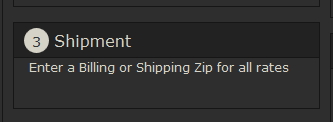
So if a customer is checking out as a guest and have not entered either a Billing or Shipping Zip, then a message is displayed to prompt them to enter a zip

Change code within \plugins\system\vponepagecheckout\cart\tmpl\default_shipment.php

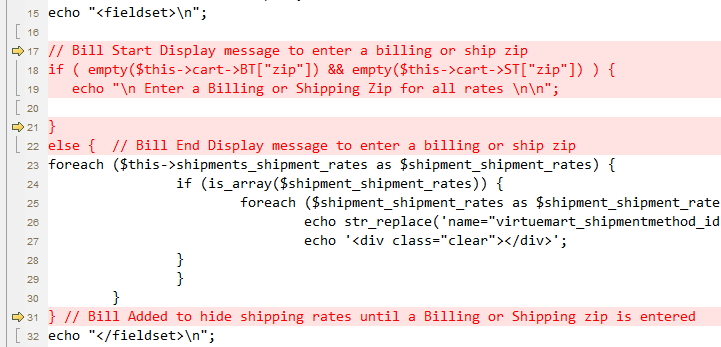
My code is surrounded by my Start and End comments. Also I uploaded a picuture showing the exact lines I entered.
if ($this->found_shipment_method) {
echo '<div class="inner-wrap">';
 
// Bill Start Display message to enter a billing or ship zip
if ( empty($this->cart->BT["zip"]) && empty($this->cart->ST["zip"]) ) {
   echo "\n Enter a Billing or Shipping Zip for all rates \n";
 
}
else {  // Bill End Display message to enter a billing or ship zip
foreach ($this->shipments_shipment_rates as $shipment_shipment_rates) {
		if (is_array($shipment_shipment_rates)) {
			foreach ($shipment_shipment_rates as $shipment_shipment_rate) {
				echo str_replace('name="virtuemart_shipmentmethod_id"', 'name="virtuemart_shipmentmethod_id" onclick="return ProOPC.setshipment(this);"', $shipment_shipment_rate);
				echo '<div class="clear"></div>';
	    	}
		}
	}
} // Bill Added to hide shipping rates until a Billing or Shipping zip is entered
echo "</fieldset>\n";
echo "</div>";
}
else {
	echo '<div class="proopc-alert-error">'.$this->shipment_not_found_text.'</div>';
} ?>

Attached is final result and the code change highlighted.
Attachments:
The topic has been closed.
Mon Oct 7, 2013 7:11 pm
Okay, but that becomes a static message. The message will not get hidden even after the user enters the zip code.

I do not mind if you are happy with the same.
Post your reviews about us on our Facebook Page.
Post your testimonials and suggestions Here.
Don't forget to Close your topic when resolved.
The topic has been closed.
Mon Oct 7, 2013 7:18 pm
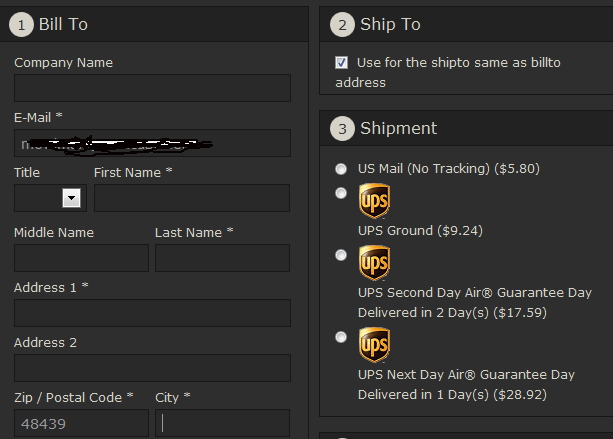
For me, The message goes away if I enter either a billing zip and hit tab or Shipping zip and hit tab.
All of my shipping rates are displayed without the message.
Attachments:
The topic has been closed.
Mon Oct 7, 2013 7:19 pm
That's great. Probably you have activated Auto Select Payment and Auto Select Shipment in VM Config. :)
Post your reviews about us on our Facebook Page.
Post your testimonials and suggestions Here.
Don't forget to Close your topic when resolved.
The topic has been closed.